How to use the site
This guide shows, screen by screen, how to buy a phone, get it repaired, sell your old one and track your request on the NYXEL Phone website. The screenshots come from the English version of the site.
1. Getting around
Everything works from your phone, with no app to install: open the site address in your browser.
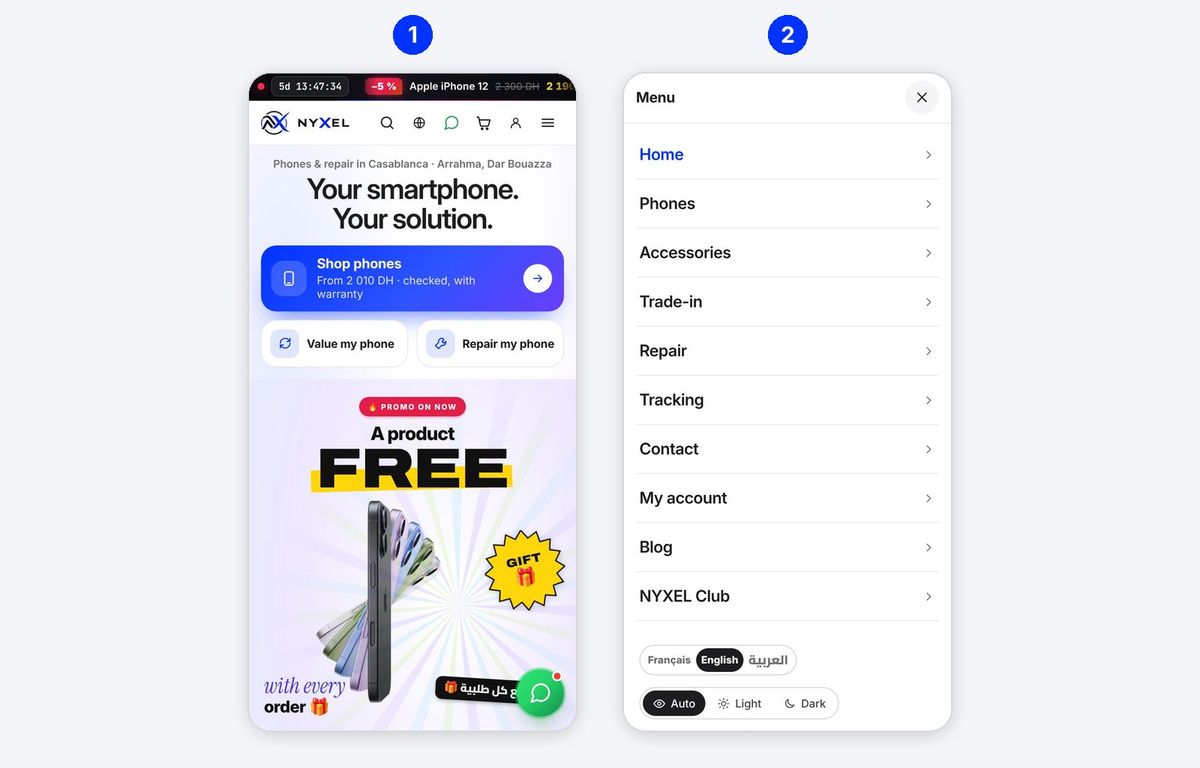
- The home page offers three shortcuts: Shop phones, Value my phone (trade-in) and Repair my phone.
- The menu (☰ at the top right) leads to every page. At the bottom, choose the language (Français, English, العربية) and Light or Dark display.
| Icon | What it does |
|---|---|
| Magnifier | Search a model (“iPhone 13”, “S23”…) |
| Globe | Change language |
| Green bubble | Message the shop on WhatsApp |
| Cart | See your cart |
| Person | My account |
2. Finding a phone
Every phone shown is really in the shop, with its price, condition and battery health.
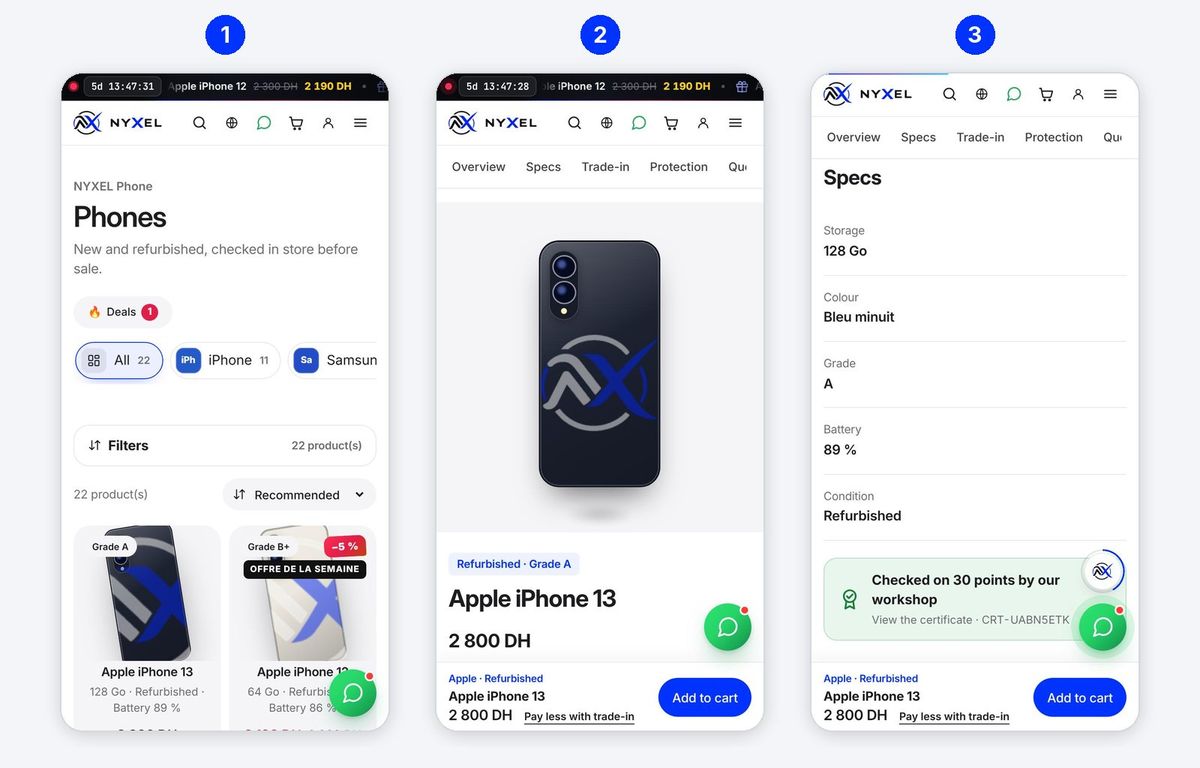
- The catalogue (Phones in the menu): tap a brand (iPhone, Samsung…) or Deals, then Filters to choose budget, storage or condition. Recommended sorts by price.
- The phone page: photos (or a 3D view you turn with your finger), price, condition and grade. The blue Add to cart button always stays at the bottom of the screen.
- Specs: storage, colour, grade, battery % and condition. The green box Checked on 30 points by our workshop opens the phone's inspection certificate (section 10).
| Word | Meaning |
|---|---|
| New | Never used, in its box |
| Refurbished / used | Previously used, checked and cleaned by the NYXEL workshop |
| Grade A+, A, B+, B | Outside look: A+ like new, B visible signs of use |
| Battery 89 % | Remaining battery capacity compared with a new one |
Pay less with trade-in: under the price, this link shows how much your old phone takes off (section 4).
3. Ordering
Nothing to pay online: you pay on receipt, in the shop or to the courier. The order is confirmed with you on WhatsApp.
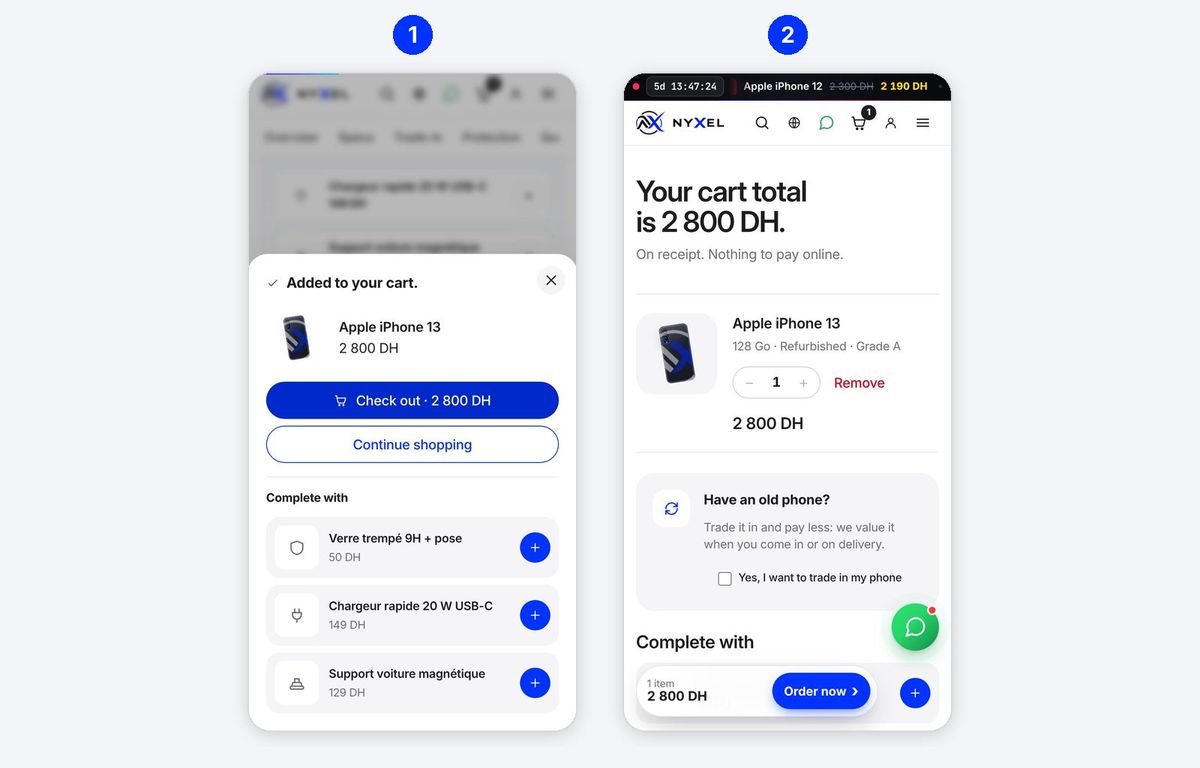
- Tap Add to cart. A window confirms it and suggests useful accessories (screen protector, charger…): tap + to add one, or Check out to continue.
- The cart shows the total. Change the quantity (− / +) or Remove an item. Have an old phone? Tick Yes, I want to trade in my phone: it is valued when you come in or on delivery, and its value is deducted. Then tap Order now.
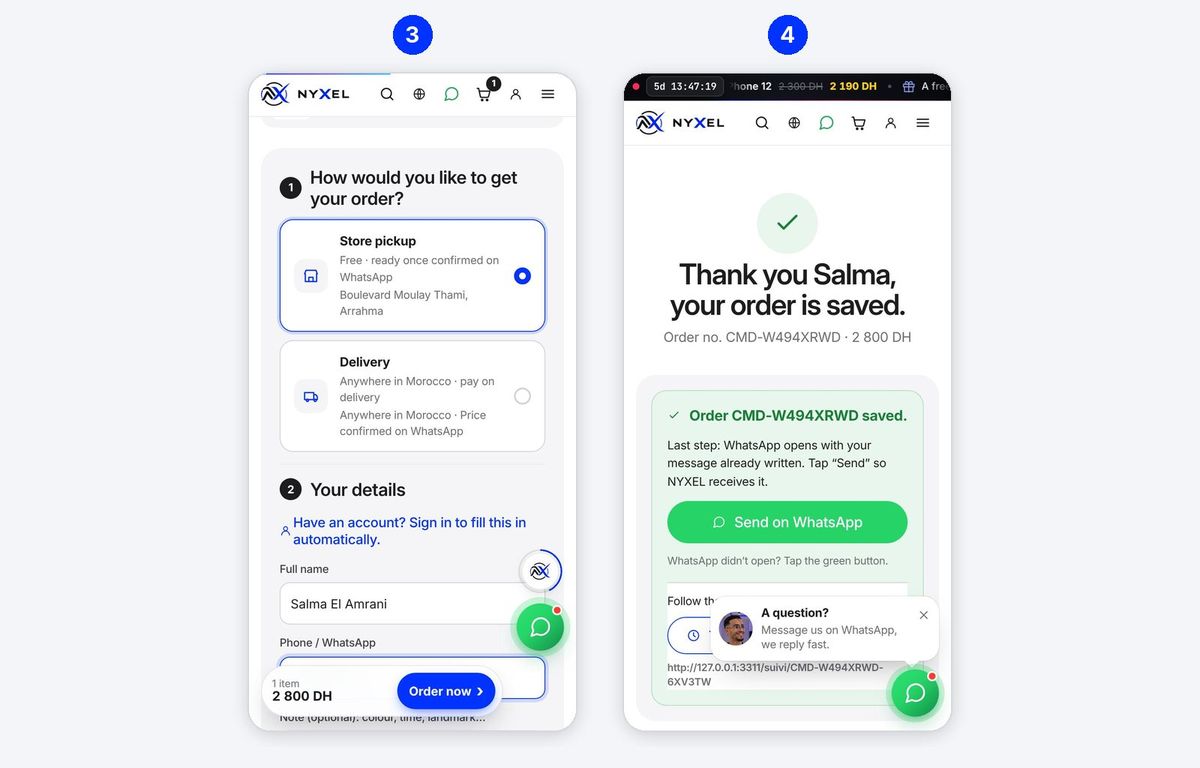
- How would you like to get your order? Store pickup: free, ready once confirmed on WhatsApp, Boulevard Moulay Thami, Arrahma. Delivery: anywhere in Morocco, pay on delivery, delivery price confirmed on WhatsApp. Then fill in Your details: full name, phone number (your WhatsApp number) and, for delivery, the address.
- Confirmation: the site shows your order number (e.g. CMD-W494XRWD). Last step: tap Send on WhatsApp. WhatsApp opens with your message already written; tap Send so NYXEL receives it.
Keep your order number: it is used for tracking (section 6). Already have an account? Sign in at the top of the form and your details fill in automatically.
4. Selling or trading in your phone
In one minute the site values your phone from real market prices, so you know what it is worth before coming in.
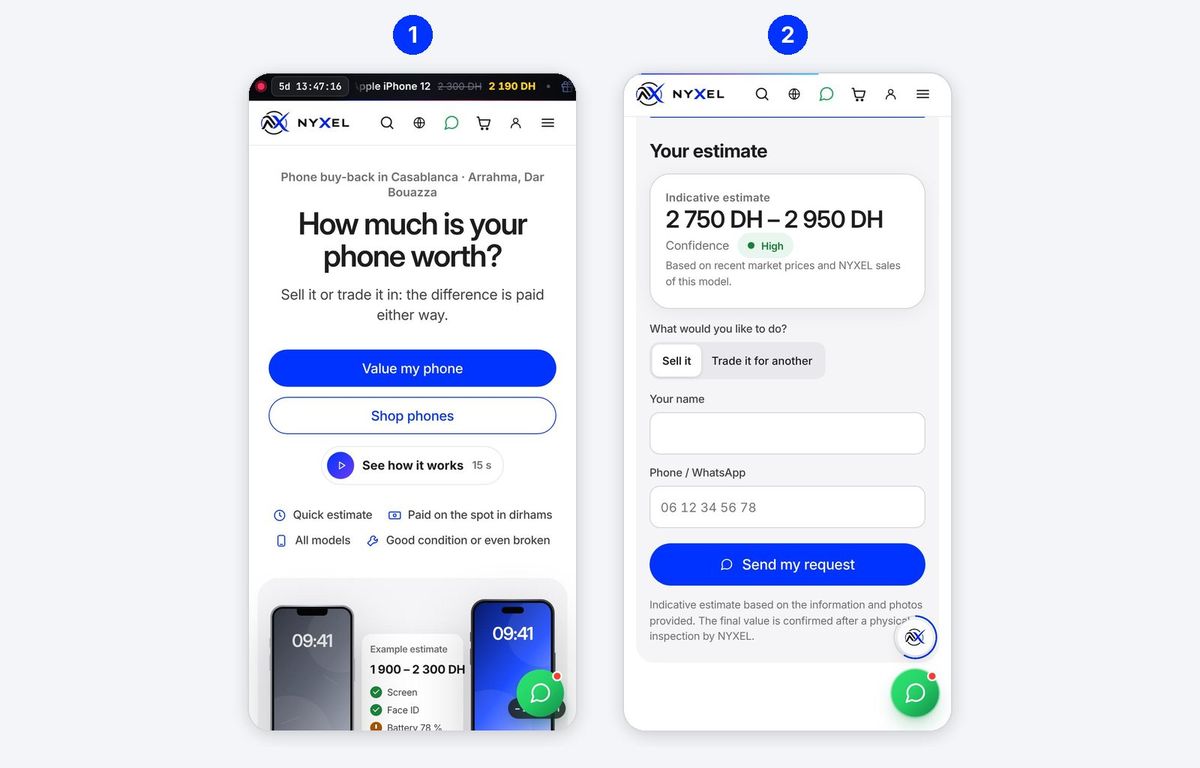
- Open Trade-in in the menu, then Value my phone. Answer the questions one by one: brand, model, storage, condition of the screen, body and battery. See how it works plays a 15-second animation.
- Your estimate appears (e.g. 2 750 – 2 950 DH, confidence High). Choose Sell it or Trade it for another, enter your name and WhatsApp number, then Send my request. WhatsApp opens with the request and its number (EST-…): tap Send.
In the shop, the phone is checked in front of you (IMEI, iCloud or Google account removed, screen, battery) and the final price is confirmed. You are paid on the spot, or the value is deducted from the phone you take.
5. Getting a repair
Diagnosis is free and nothing is repaired until you agree to the price.
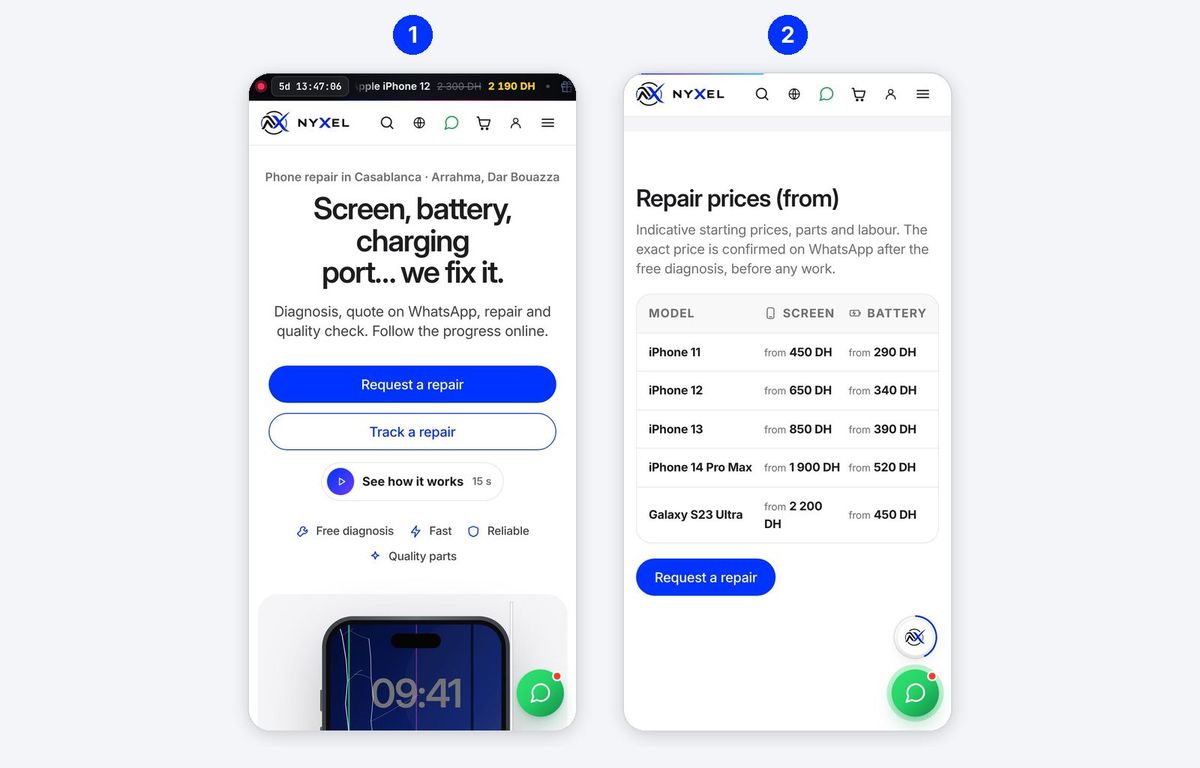
- Open Repair in the menu, then Request a repair.
- The Repair prices (from) table gives a first idea for the screen and battery of each model. The exact price is confirmed on WhatsApp after diagnosis.
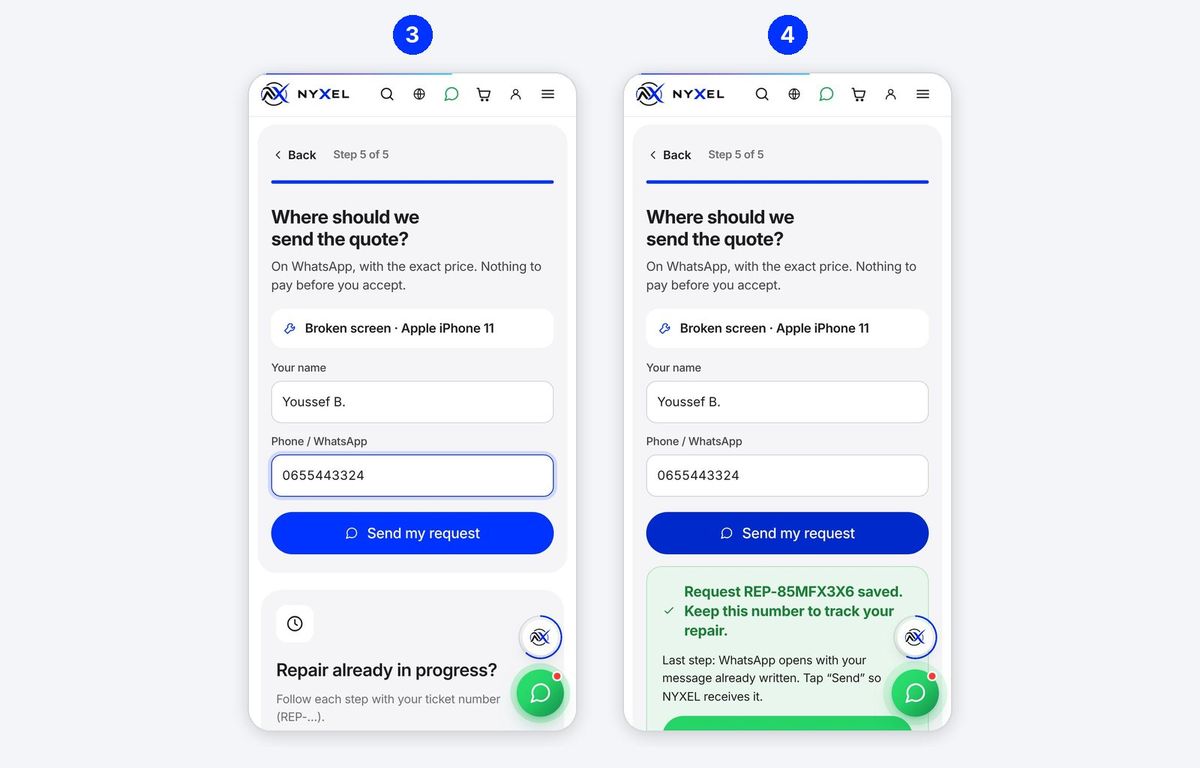
- Answer the 5 steps: the fault (broken screen, battery, charging, water…), the brand, the model, a few words about the problem and when you will come, then your name and WhatsApp number. Tap Send my request.
- The request gets a number (e.g. REP-85MFX3X6). Keep it: it is used to track the repair. Tap Send on WhatsApp, then Send in WhatsApp.
What happens next
- You drop the phone off at the shop.
- NYXEL runs the diagnosis and sends you the quote on WhatsApp.
- You accept: the part is ordered if needed, then the phone is repaired and checked.
- A WhatsApp message tells you when it is ready. You pay on collection, after trying the phone.
Repairs come with a warranty: it is written on your ticket and can be sent to you as a PDF certificate.
6. Tracking your request
Tracking shows live where your repair, order or trade-in stands, without having to call.
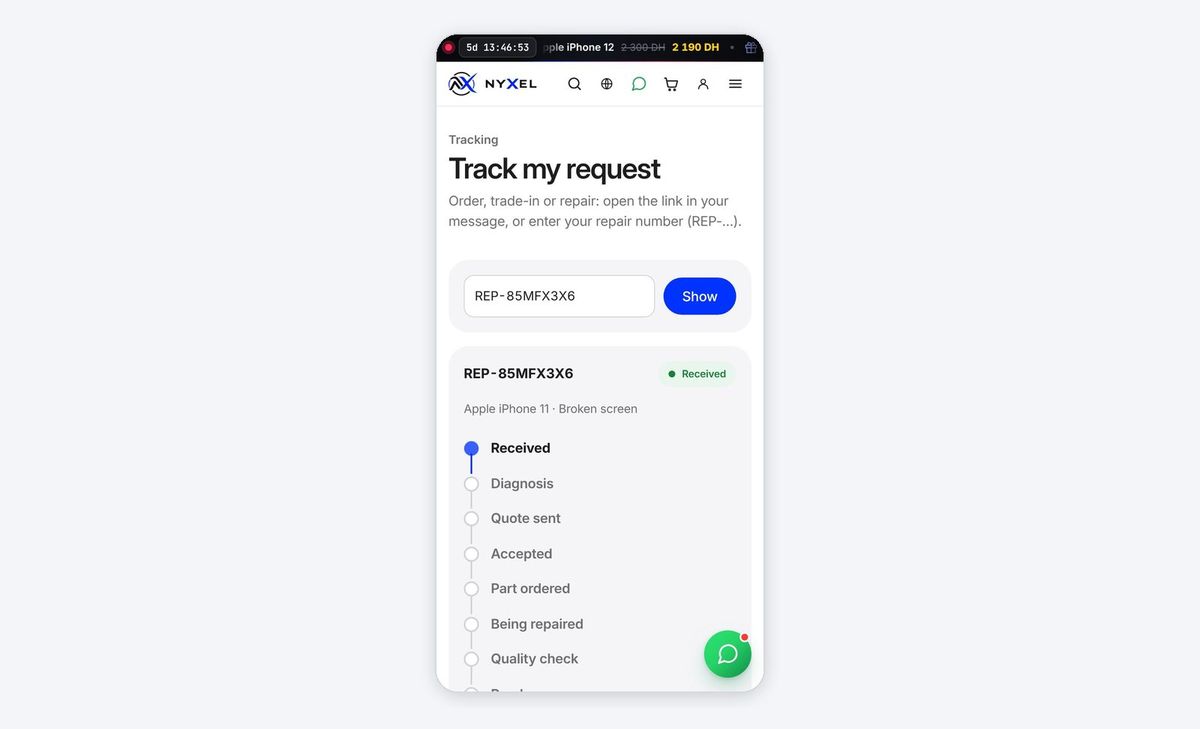
- Easiest: open the link you received on WhatsApp; it goes straight to your tracking page.
- Otherwise: menu › Tracking, type your repair number (REP-…) and tap Show. For an order (CMD-…) or a trade-in (EST-…), use the link you received: it contains a key that protects your information.
| Step | What happens |
|---|---|
| Received | Your request has reached the shop |
| Diagnosis | The technician looks for the fault (free) |
| Quote sent | The price is sent to you on WhatsApp |
| Accepted | You said yes to the quote |
| Part ordered | The part is on its way (if not in stock) |
| Being repaired | The phone is on the bench |
| Quality check | Everything is tested after the repair |
| Ready | You can come and collect it |
| Delivered | Collected and paid |
At the key steps (quote, ready), the shop also sends you a WhatsApp message with the tracking link.
7. My account
An account is optional: you can order without one. It keeps the history of your orders, trade-ins and repairs and gives access to the loyalty card.
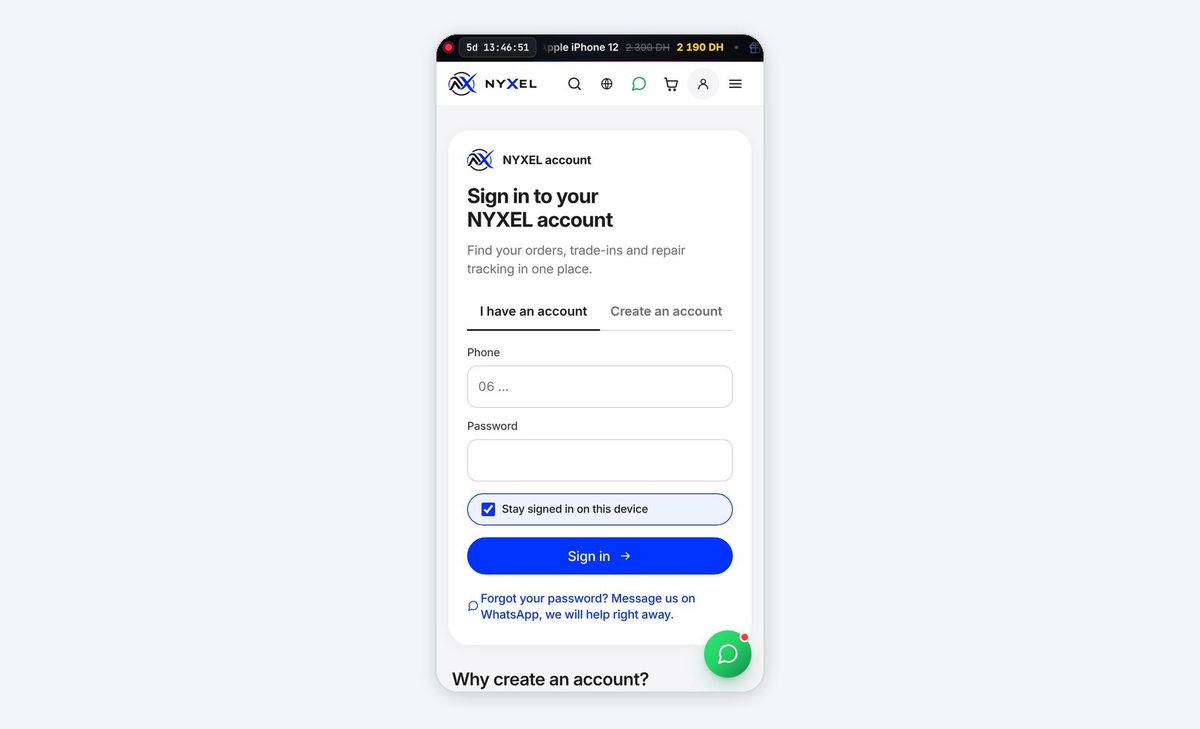
Create an account (person icon › Create an account tab):
- Enter your first and last name, your WhatsApp number, an email if you like, and a password (at least 8 characters).
- Tick the consent box for keeping your information, then create the account. A short anti-robot check runs by itself while you fill in the form.
- If the shop has turned it on, you receive a code on WhatsApp: type it to confirm the number is yours.
Sign in: I have an account tab, number + password. Keep Stay signed in on this device ticked on your own phone, untick it on a borrowed one.
Forgot your password? Tap the link under the button: it opens WhatsApp and the shop gives you a temporary password, to change afterwards in My account.
In My account you can also edit your details, change your password, sign out or delete your account.
8. Loyalty club
Every purchase earns points, then exchanged for gifts. The card lives on your phone: no app, no plastic card.
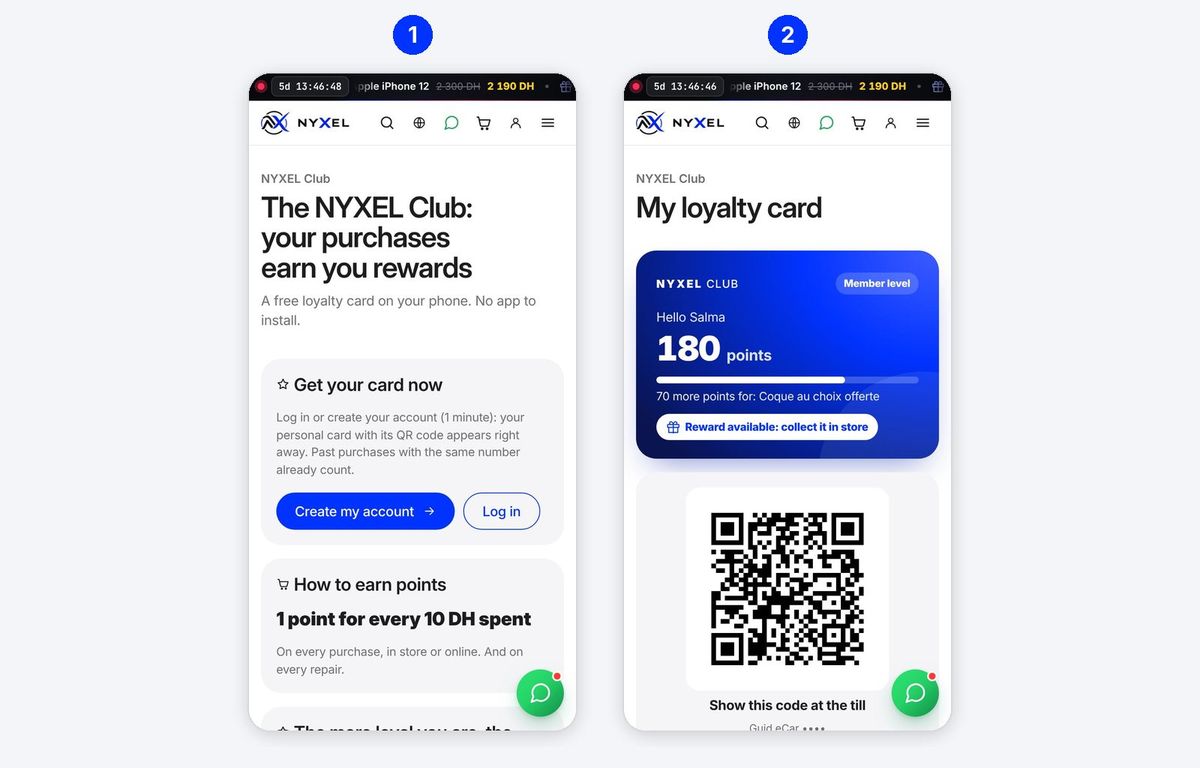
- Get your card: menu › NYXEL Club › Create my account (or Log in). The card appears immediately, and past purchases made with the same number are counted.
- The card shows your points, your level and the next gift. In the shop, show the QR code at the till: points are added automatically. The Apple Wallet and Google Wallet buttons save the card in your phone's wallet when the shop has turned them on.
Default rules (the shop can change them; the Club page always shows the current rules):
| Rule | Value |
|---|---|
| Points earned | 1 point per 10 DH spent, purchases and repairs |
| Review after a purchase | +50 points |
| Levels | Member from sign-up, Silver from 3,000 DH spent over 12 months (+10 % points), Gold from 8,000 DH (+25 %) |
| Gifts | 100 pts: screen protector · 250 pts: case of your choice · 500 pts: 100 DH off · 1,000 pts: earphones |
To use a gift, just ask at the till: the seller takes it off your points.
9. Leaving a review
Only real customers can leave a review: that is what makes the reviews on the site reliable.
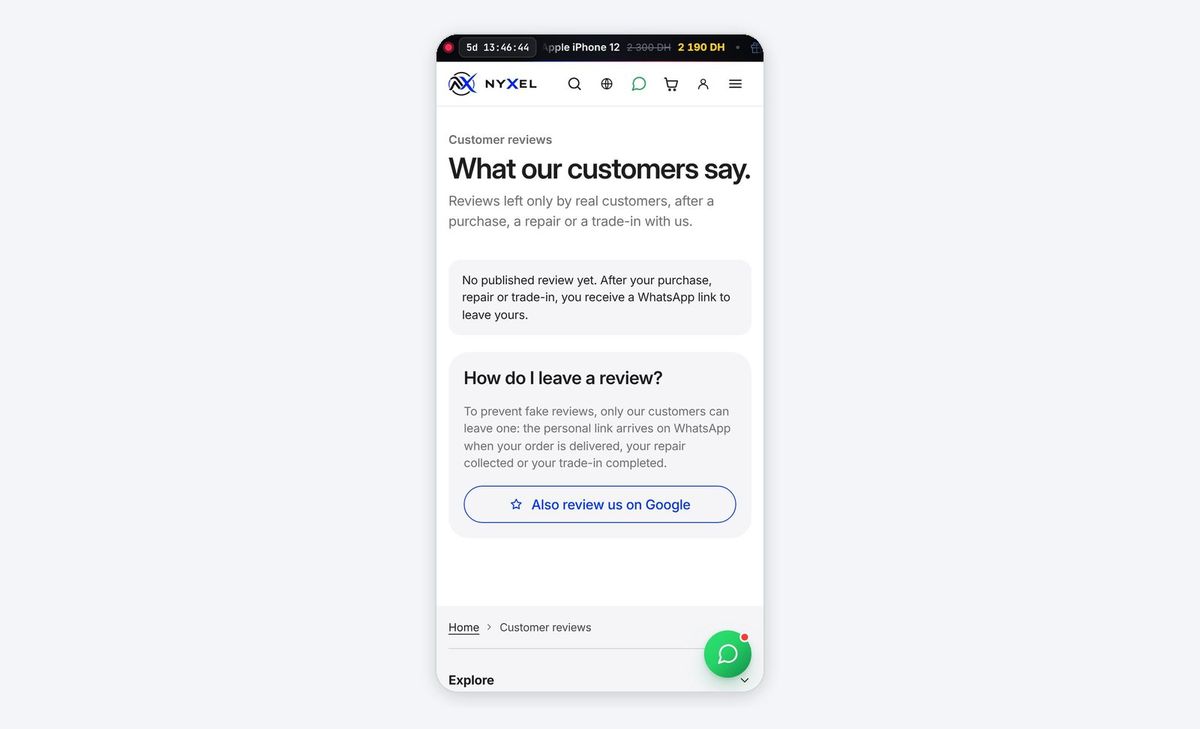
- After an order is delivered, a repair collected or a trade-in completed, you receive a personal link on WhatsApp to leave your review.
- Open it, choose 1 to 5 stars and write a few words (required for 3 stars or fewer, so the shop can improve).
- Send it. If you have a loyalty card, your bonus points are added.
One review per request. The Reviews page (menu) shows published reviews; Also review us on Google helps the shop be found on Google Maps.
10. Checking a NYXEL certificate
Every phone checked or sold by NYXEL can have an inspection certificate (30 points checked) or a warranty certificate, with a CRT-… number and a QR code. Anyone can check it is genuine, even the phone's next buyer.
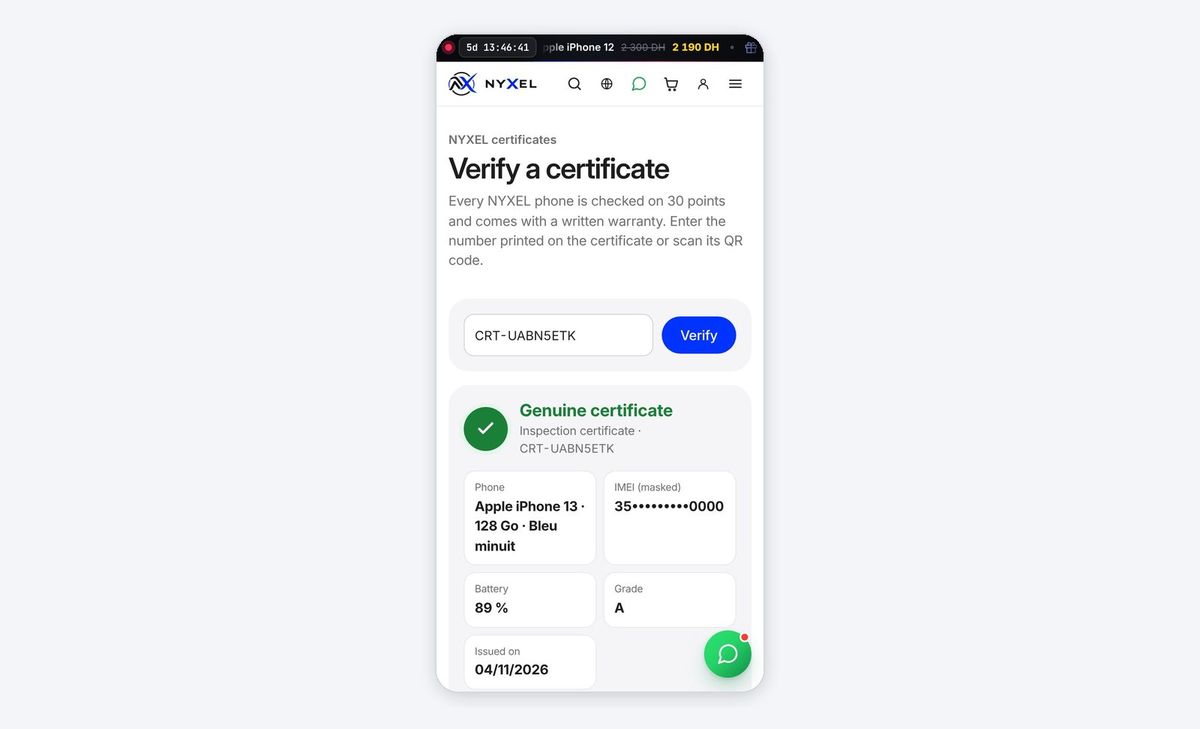
- Scan the certificate's QR code with the camera, or tap Verify a certificate at the bottom of any page of the site and type the number (e.g. CRT-UABN5ETK), then Verify.
- Genuine certificate appears in green, with the phone, battery, grade, date and, for a warranty, the end date.
- Compare with the phone: dial
*#06#on the phone; the last 4 digits of the IMEI must match those shown.
A cancelled certificate is shown in red, marked cancelled. Your name, number and price are never shown on this page.
11. Contact, opening hours, buying guide and blog
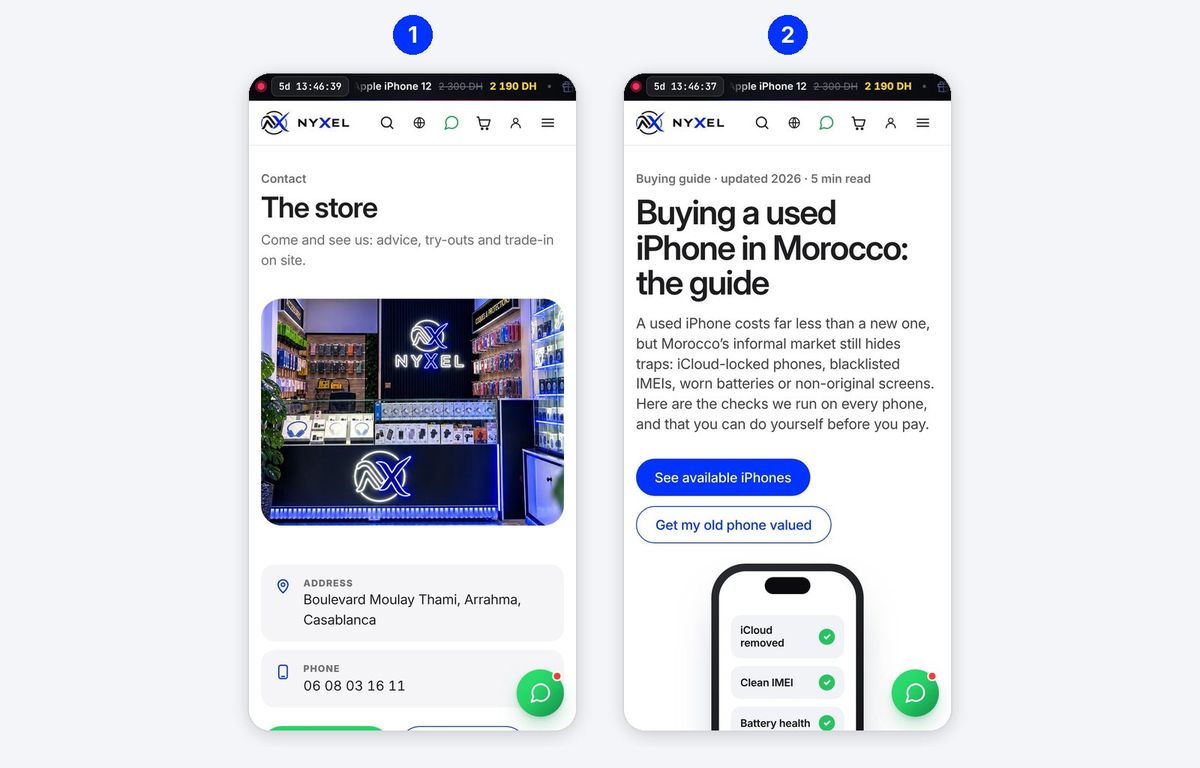
- Contact (menu): address (Boulevard Moulay Thami, Arrahma, Dar Bouazza, Casablanca), phone, opening hours, Google Maps directions, WhatsApp, Instagram and TikTok.
- The buying guide Buying a used iPhone in Morocco lists the 10 checks to make before buying (iCloud, IMEI, battery, original screen…), which NYXEL runs on every phone.
The Blog (menu) publishes tips: repair prices, battery care, choosing a phone. Every article can be shared on WhatsApp in one tap.
12. FAQ and safety
Do I have to pay online? No. You pay in the shop or to the courier, on receipt. The site never asks for a bank card number.
I don't have WhatsApp. Call the shop on the number on the Contact page: your order or request stays saved with its number.
WhatsApp didn't open after sending. Your request is saved anyway (you have its number). Tap Send on WhatsApp on the confirmation page, or simply send that number to the shop.
“Anti-robot check missing or expired” appears. The page stayed open too long. Refresh it and send again: the check runs again in a second, with no box to tick.
“This request was already received”. It arrived the first time: no need to send it again, the shop will contact you.
Is my information protected? It is only used to handle your request and is never sold. The certificate check page shows no name, number or price, and the IMEI is masked. To improve, the site counts visits anonymously: no cookies, no name or number, and your browser's “Global Privacy Control” setting is respected. You can delete your account at any time from My account.
Beware of scams. NYXEL will never ask you for a code received by SMS, your password, or an advance payment outside the shop. If in doubt, call the number on the Contact page.
iPhone · Samsung · Buying a used iPhone in Morocco: the guide